Top Video Editing Tools For Social Media Growth And Engagement
In 2026, video content continues to dominate social platforms but great videos dont happen by accident. Behind every engaging Reel, Shorts clip, Instagram carousel, or YouTube video is video editing software that brings ideas to life, improves watch time, and boosts engagement.
Whether youre a beginner creator just starting or an experienced influencer looking to level up your production, choosing the right video editing tool is one of the biggest decisions youll make for your content strategy.
This guide breaks down the best video editing software for content creators and influencers in 2026, including tools for mobile, desktop, professional workflows, and budget-friendly options plus how to pick the right one for your needs.
Why Video Editing Software Matters for Creators in 2026
Video editing software isnt just about cutting clips. In 2026, top tools help creators:
Improve storytelling and pacing
Add motion graphics and captions that drive watch time
Optimize content for each platform (TikTok, Instagram Reels, YouTube Shorts, LinkedIn, Facebook)
Use sound design and transitions to keep attention
Repurpose one edit into many formats (square, portrait, landscape)
Great editing can be the difference between a scroll-past and a saved, shared, or pinned video.
How We Evaluated These Tools
Each video editing app in this list was evaluated based on criteria that matter most to creators:
Ease of Use
How intuitive it is for beginners and non-technical users.
Platform Support
Does it export optimized formats for TikTok, Reels, YouTube, etc.
Feature Set
Editing tools, effects, color correction, audio tools, AI features.
Speed & Performance
How quickly edits can be completed without lag.
Pricing & Value
Affordable tiers, free plans, or creator-friendly subscriptions.
Community & Learning
Templates, tutorials, and community support.
Best Video Editing Software for Content Creators in 2026
Below are the most effective tools that balance power, usability, and creator value.
1. Adobe Premiere Pro Best for Professional Creators & Agencies
Best for: Advanced editing, long form videos, professional exports
Adobe Premiere Pro remains one of the industrys most powerful editors. Its widely used by creators, brands, and teams due to its:
Timeline editing with precision controls
Advanced color grading (Lumetri)
Multicam and nested sequence workflows
Motion graphics integration (with After Effects)
Broad codec support
Pros:
Professional features for high-end editing
Works with Photoshop/After Effects ecosystem
Frequent updates and industry standards
Cons:
Steeper learning curve
Higher subscription cost
Ideal for: Creators targeting YouTube growth, film-style editing, or brand campaigns.
2. Final Cut Pro Best Mac-Optimized Editing Tool
Best for: Apple users seeking performance and power
Final Cut Pro is a favorite among creators on macOS for its:
Magnetic timeline
Rapid rendering performance
Advanced keyframing tools
360 video support
Pros:
Extremely fast real-time playback
One-time purchase option
Deep Apple ecosystem integration
Cons:
Mac-only software
Ideal for: Creators who want high performance without monthly fees.
3. DaVinci Resolve Best Free Professional Grade Editor
Best for: Creators who want advanced tools at no cost
DaVinci Resolve stands out because its free version rivals paid tools. Highlights include:
Studio-level color grading
Fusion for VFX
Fairlight audio suite
Powerful editing and media management
Pros:
Professional features in free tier
Advanced color and audio tools
Scalable for complex projects
Cons:
Steeper learning curve for beginners
Ideal for: Creators who plan to grow into professional-style editing without upfront costs.
4. CapCut Best Mobile-Focused Editing App
Best for: Quick edits on phone/tablet
CapCut exploded in popularity because its:
Easy to use
Packed with templates
Integrated transitions and filters
Beat-sync and auto captions
Pros:
Free and intuitive
Excellent for short-form videos
Templates built for TikTok/Reels
Cons:
Less control than desktop editors
Ideal for: Mobile creators focusing on TikTok, Instagram Reels, Shorts.
5. LumaFusion Best iOS Mobile Editing App
Best for: Professional-level mobile editing
LumaFusion is one of the few apps that brings pro features to mobile, including:
Multitrack timeline
Keyframe animations
Advanced color tools
Broadcast-quality output
Pros:
Powerful features on iOS devices
One-time purchase
Great for on-the-go edits
Cons:
iPad/Apple device only
Ideal for: Mobile pros, vloggers, and traveling creators.
6. InVideo Best Cloud & Template-Driven Editing Tool
Best for: Quick marketing edits with templates
InVideo helps creators make polished content fast with:
Pre made templates
Text to video AI tools
Social format presets
Stock media libraries
Pros:
Web-based (no install)
Fast output
Good for marketing & ads
Cons:
Less deep editing control
Ideal for: Brands, social managers, and small teams.
7. Movavi Video Editor Best for Beginners
Best for: Creators new to editing
Movavis simple UI makes editing approachable while still offering:
Drag-and-drop timeline
Built-in effects
Basic color/audio tools
Pros:
Easy to learn
Affordable
Templates available
Cons:
Limited advanced features
Ideal for: Beginners focusing on content fundamentals.
8. Filmora Best All-Around Beginner-to-Advanced Editor
Best for: Creators who want both power and simplicity
Filmora combines easy UI with powerful features like:
Motion tracking
Split screen
Audio ducking
Auto beat sync
Pros:
Gentle learning curve
Lots of transitions/elements
Frequent updates
Cons:
Watermark on free tier
Ideal for: Emerging creators scaling content complexity.
9. Canva Video Best for Quick Social Media Edits
Best for: Fast, visually appealing edits without steep learning
Canvas video editor brings:
Drag and drop simplicity
Templates sized for TikTok/Reels/YouTube
Stock media and animations
Pros:
Super easy for social formats
We based
Great for designers
Cons:
Not deep enough for complex editing
Ideal for: Quick social edits and content teams.
10. VN Video Editor Best Free Cross-Platform Editor
Best for: Creators who want free multi-platform editing
VN combines lightweight performance with features like:
Keyframe animation
Curve editor
Auto captions
Multiple aspect ratios
Pros:
Free
Works on mobile + desktop
Good for short and mid-form content
Cons:
UI can feel busy
Ideal for: Creators who want flexibility across devices.
How to Choose the Right Video Editing Software in 2026
Selecting the right tool depends on your goals, skill level, and publishing rhythm.
If Youre a Beginner
start with CapCut, Canva Video, or Movavi
If Youre Scaling to Professional
use Final Cut Pro, Premiere Pro, or DaVinci Resolve
If You Want Mobile Workflow
choose LumaFusion or CapCut
If You Need Quick Templates
InVideo or Canva Video
If You Want Cross-Platform Editing
VN Editor or Filmora
How Good Editing Software Boosts Social Media Growth
Great editing boosts reach and engagement by:
increasing watch time
improving clarity through captions
making content feel more professional
aligning pacing with platform algorithms
enabling repurposing across formats (square, portrait, landscape)
In 2026, platforms all reward value + completion + engagement and editing is the most direct way to influence those signals.
Tips for Using Video Editing Tools Effectively
1. Use Aspect Ratios for Each Platform
TikTok/Reels/Shorts: 9:16
Instagram feed: 4:5
YouTube: 16:9
Stories: 9:16
2. Add Auto-Captions
Most people watch on mute first.
3. Use Motion Graphics
Keep attention with dynamic text and motion.
4. Pace to Music
Editing to beats increases retention.
5. Reuse Edits
One edit can cover multiple platforms with minor format changes.
Tools like AutoPost help you organize and schedule variants automatically.
How Tools Like AutoPost Help You Scale Editing + Publishing
Creating great videos is only half the battle publishing them consistently across platforms is where growth happens.
AutoPost helps creators:
schedule videos at optimal times
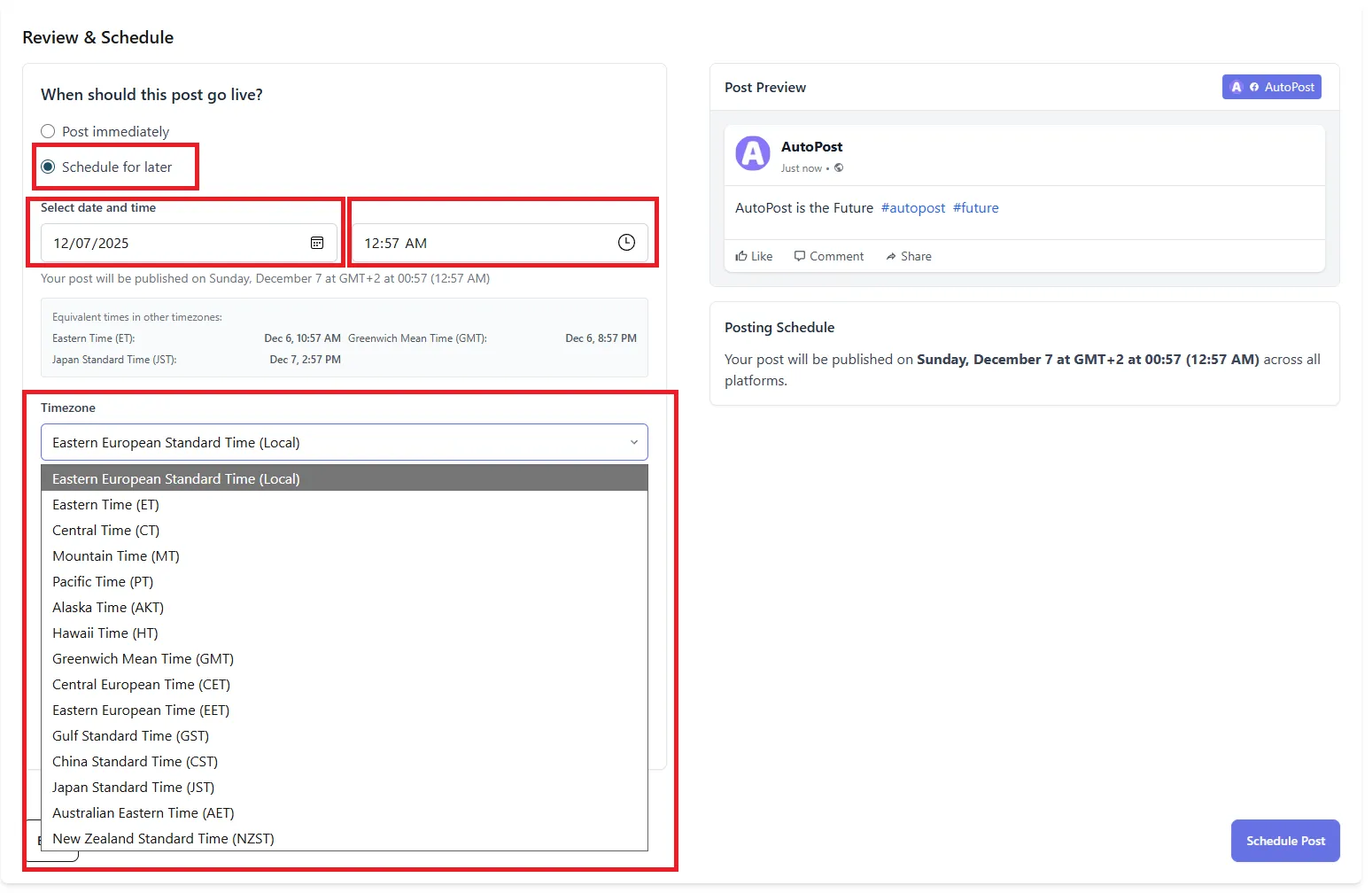
track performance signals across platforms
repurpose edits for different formats
compare engagement metrics
automate cross-platform workflows
Instead of manually exporting, uploading, and publishing, AutoPost helps you maximize the impact of every edit.
Final Thoughts: Video Editing Is a Core Growth Engine for Creators in 2026
Choosing the best video editing software for your content style and goals can create a competitive advantage in 2026.
Here's a quick recap:
Beginners: CapCut, Movavi, Canva
Mobile pros: LumaFusion, VN Editor
Intermediate creators: Filmora, InVideo
Advanced editors: Premiere Pro, Final Cut Pro, DaVinci Resolve
No matter which tool you pick, the key to growth is:
consistency
strong storytelling
platform optimization
structured workflows
Pairing the right editing software with a smart publishing system like AutoPost makes scaling your content easier so you can focus on creating more videos that grow your audience, boost engagement, and build authority.